I'm a product designer specializing in scalable complex product systems with a focus on data-heavy workflows and enterprise platforms
Based in the San Francisco Bay Area
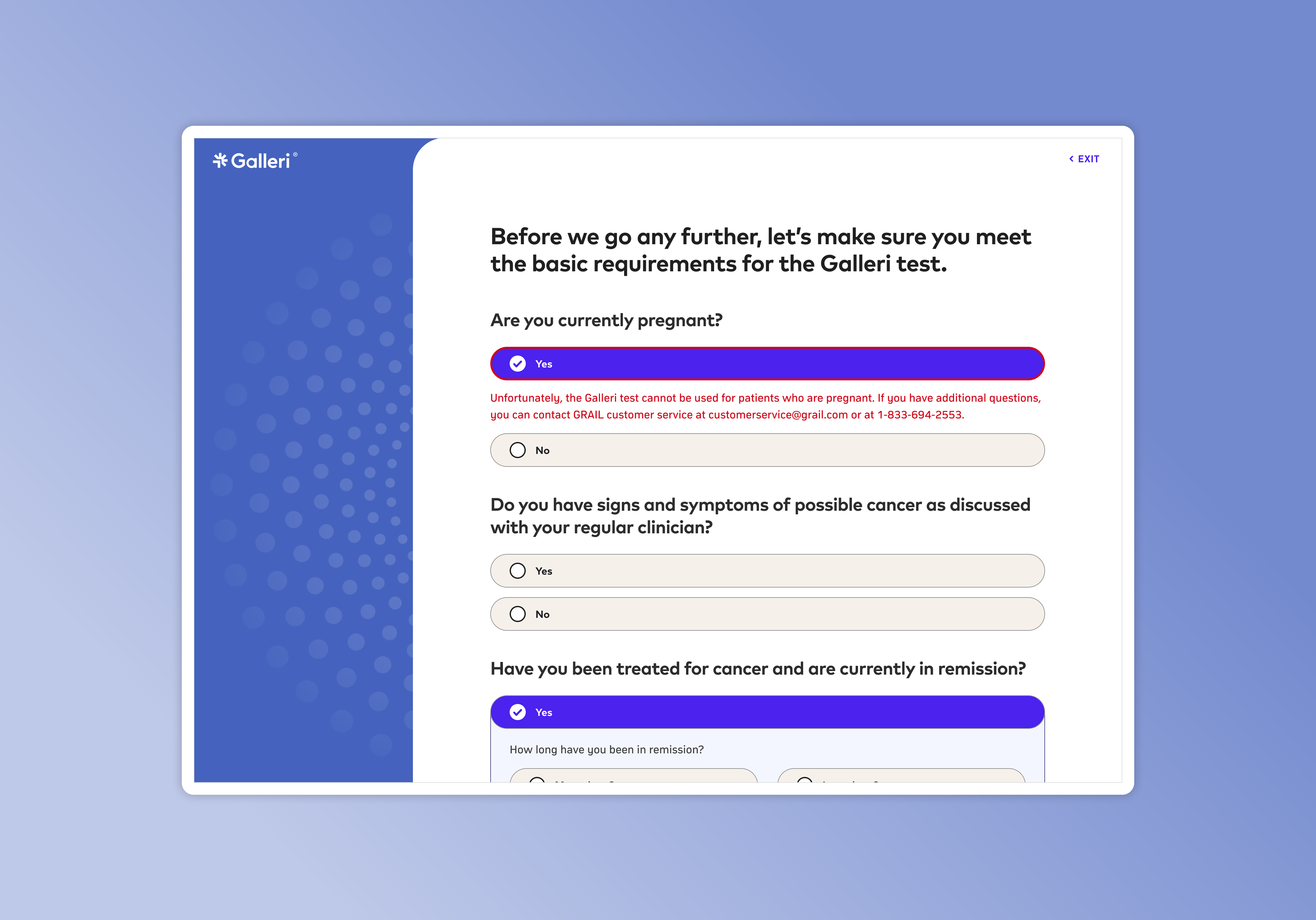
Redesigned the patient ordering experience for GRAIL's nationwide cancer screening test that significantly increased completed orders while dramatically reducing login-related support requests.
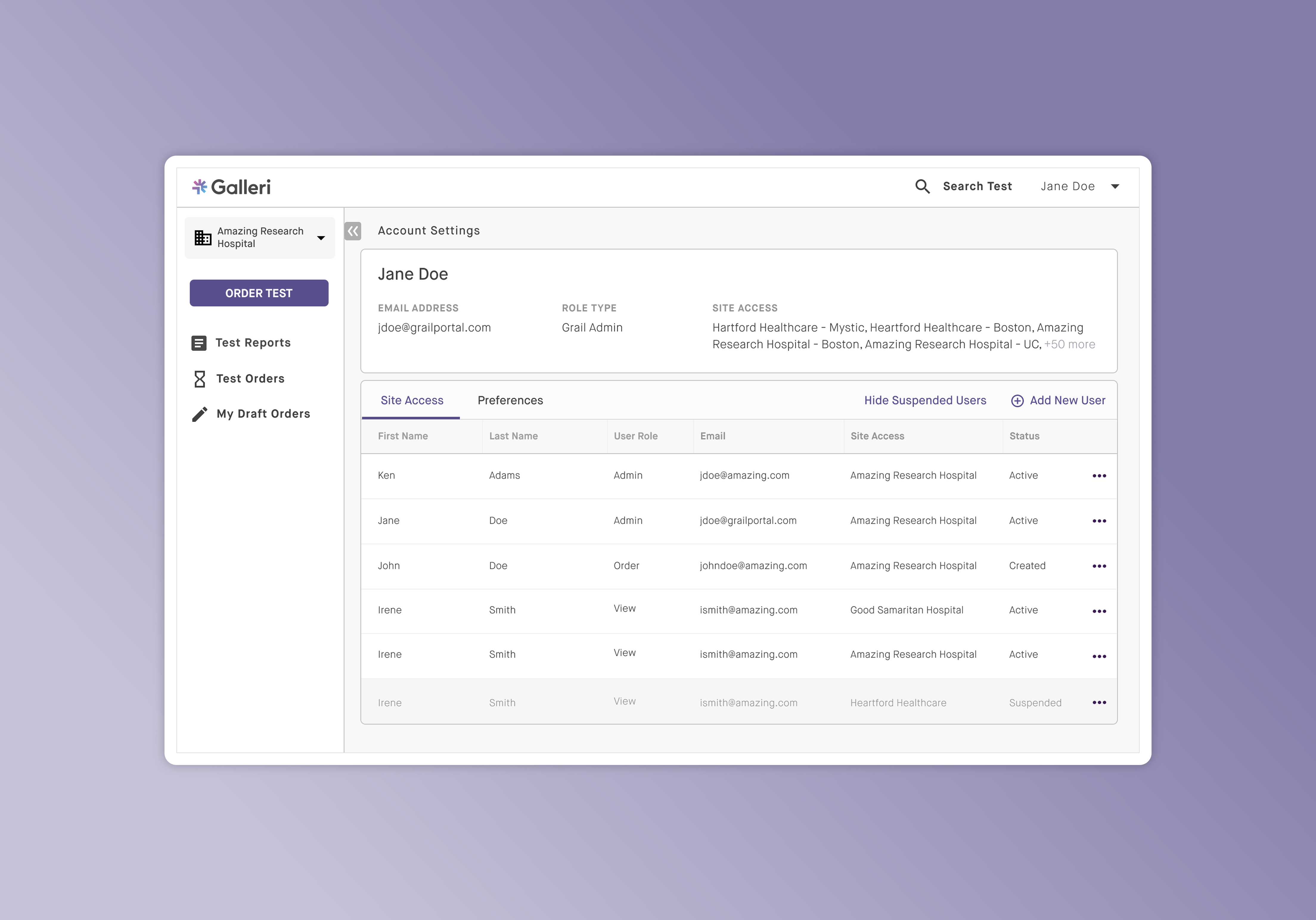
Led the design of GRAIL's provider portal enabling healthcare organizations to securely submit and manage test orders digitally, eliminating a large portion of manual corrections caused by fax-based submissions.
Built AxleHire's driver platform to support high-volume, multi-parcel delivery operations, restructuring assignment lifecycles, inventory scanning, and failure handling to scale reliability across 120k weekly deliveries.
Designed AxleHire's first client operations portal, giving enterprise customers real-time delivery visibility and automated order ingestion while reducing dispatch support requests by ~80%.
I'm a product designer who loves untangling messy problems and turning them into experiences that just click. I've been designing since 2016, blending a background in Cognitive Science with a lifelong creative streak (thanks to my artist mom) to craft products that are as intuitive as they are impactful.
I'm currently designing in the San Francisco Bay Area.
When I'm not deep in Figma, you can find me exploring one of my many hobbies from creative side projects to small experiments that let me stay curious and keep learning.
Here are a few things I've been working on for fun lately ↓


GRAIL needed to expand its Galleri cancer screening test from a benefits-only ordering flow to a direct-to-consumer onboarding system. This project redesigned and rearchitected the end-to-end ordering experience to accommodate the complexity of telemedicine, regulatory, and cross-functional constraints while reducing friction for patients.
GRAIL initially offered its early cancer detection test only through employer benefits programs or with providers directly. As the company expanded to nationwide direct-to-consumer access, the ordering experience became the primary acquisition funnel.
The test launched to the public with great momentum. Unfortunately, we were met with a lot of critical observations:
The system was optimized for structured benefits access, not public onboarding.
I ran moderated usability sessions, analyzed metrics, and went onsite to different Galleri events to discover the root of the problem. This uncovered two points:
Our hypothesis was that if we capture intent before requiring full account creation, abandonment will decrease. And so I made the following changes:
We realized the issue wasn't the account creation itself, but when it appeared. We were essentially asking for commitment before the users had confidence.
By allowing users to move forward first and formalize the account later, we aligned the system with natural decision-making: curiosity → clarity → commitment.
If users are guided with more structured steps and presented with eligibility gates early in the process, more users will complete their orders without feeling overwhelmed. With this theory in place, I made the following changes:
The problem wasn't the length but the structure and guidance.
When the form felt dense and clinical, patients hesitated. When it felt guided and sequential, they moved forward with confidence.
We launched the changes after thorough user testing to compare the redesigned flow against the legacy flow. Results were measured across completion rate, time-to-order, support ticket volume, and surveys.
The changes successfully shifted the experience from feeling overwhelming to feeling very structured. And importantly, we achieved this without compromising any medical or compliance requirements.
The biggest lesson from this project
With friction reduced at checkout, the logged in portal was open to a lot more opportunities to better the patient experience:
I'm proud that the work didn't just improve conversion but it also created a stronger foundation for long-term patient trust.
GRAIL's provider teams were managing clinical orders through a fragmented mix of fax, email, and manual data entry. This project replaced that workflow with a centralized real-time portal that gave providers full visibility into order status, specimen logistics, and results — while eliminating the manual correction loop that had been consuming ops resources.
Healthcare provider organizations ordering Galleri tests were relying on fax and phone to submit orders, check status, and resolve issues. GRAIL's ops team was spending significant time manually entering and correcting these submissions and providers had no visibility into what happened after they sent a fax.
The real-time Provider Portal was designed to give providers a self-service interface that handled the full order lifecycle digitally, with live status tracking and automated validation.
The problems we faced was clear that scalability was the key issue of this manual process both internally and externally. We needed a scalable way for providers to submit eligible prescriptions directly into our lab system.
At first, the solution seemed obvious: Build a digital version of the paper requisition form. We conducted research sessions with our user base, providers, nurses, and practice admins, to understand how they currently handled submissions and results and if our hypothesis was the right direction.
The fax was open to incomplete and incorrectly filled out fields. The digital form in the portal were created with specific validations in mind. For example, we learned that about 85% of faxes were missing the patient's email address. Providers did not know that field is a hard requirement on GRAIL's end to start processing the order. The email address field was created with email validation APIs to ensure the validity and format of the inputs.
Not only did these validations effectively eliminate incomplete or incorrectly filled out forms, but they also lifted the burden of manual re-entry of information and manual error correction workflows for our internal team. The digital form placed the responsibility of checking the information to the portal user rather than our internal team who are not really part of the process.
To be compliant under digital HIPAA law and regulations, we made sure to fully flesh out the complexities surrounding access controls and scoped notifications.
This was crucial in preventing data overexposure while keeping workflows simple. Below you can see the workflow of access control.
Larger provider organizations wanted to connect their existing EHR systems directly to GRAIL's order management system via API. We designed a configuration that allowed admins to map their EHR fields to GRAIL's order schema.
The most important lesson from the Provider Portal was that workflow trust matters more than feature completeness. Providers didn't need every capability on day one. They needed to trust that the system was accurate, that their submissions weren't falling into a void, and that when something went wrong they'd know immediately and know how to fix it.
Designing the inline validation layer was technically straightforward, but getting the error copy right, specific, non-blaming, actionable, required more iteration than any other design element on the page. Clinical staff are time-pressured and error-averse. Every message had to feel like a helpful guide, not a system rejection.
I also learned that role-based access in B2B platforms is often under-designed. Most tools treat it as a permissions matrix buried in settings. We surfaced it as a first-class onboarding step.
AxleHire's whitelabel last-mile services were projected to grow 8x in volume as we expanded into new regions nationwide. However, the sudden growth was going to cause a huge burden on our internal teams as our Driver App was not equipped to handle the quick increase in volume. The driver app was completely redesigned with efficient workflows incorporating multi-package scanning and failure handling flows to scale reliably to 98.4% on-time delivery across 120k weekly deliveries.
AxleHire (now Jitsu) operates as a last-mile carrier for clients including major retailers and e-commerce platforms. At the growth from 15k to 120k weekly deliveries, a 1% failure rate meant 1,200 failed packages per week — each one a support ticket, a customer complaint, and a potential client penalty.
The existing driver tooling wasn't built for this scale. Drivers were working around the app's limitations daily, creating informal workarounds that introduced inconsistency and made ops oversight nearly impossible.
Driver interviews and ride-alongs revealed that the existing app was being used as a list reference, not an operational tool. Drivers had developed their own systems — sticky notes on dashboards, personal spreadsheets, group chats with dispatchers — to compensate for what the app couldn't do.
The breakdown wasn't just navigation or a routing volume issue. It was lifecycle clarity. We needed to explicitly map the lifecycle of a delivery with workflows for each state.
This was especially important because the Driver App sat in the middle of a live, multi-spoke ecosystem of products (Warehouse App, Dispatch App, Client App, Routing Algorithm). Every driver action triggered operational consequences elsewhere. This required designing the app as a coordination layer, not as a standalone tool.
Before designing any screens, we mapped the complete delivery lifecycle. This revealed 10 distinct states a package could be in which gave insight into which states had no explicit workflows.
Instead of reacting to errors, I designed predictable workflows for each state. In order to do this, I made sure that each state was created with the following:
The original app accounted for the successful delivery path very clearly. However, failure is not an edge case in last mile logistics. It is an ingrained part of the system. So it was important to create explicit workflows to guide drivers on how they should handle these situations.
All failed deliveries are compiled at the end for reattempts. Instead of failures getting lost in the system, this explicitly allows the driver to readdress failures that happened earlier in their route. This explicit screen seamlessly flows into the delivery pattern for drivers to reattempt the deliveries.
For routes that have failed deliveries even after reattempts, a workflow was explicitly created for these packages to be returned to the warehouse. This ensured that every failed delivery for the day makes it back to the warehouse and reattempted the next day if possible.
When analyzing the effects of our growth, we identified that inbound processes did not collapse under the weight of increased volume. It was due to the fact that our warehouse app had a scanning device that utilized our label's QR codes. It brought on the idea to use the same uniquely identifiable QR codes for our drivers as well.
Previously, drivers had to manually verify their packages one by one. It was a very taxing process especially at the warehouses where drivers were dealing with an average of 24 packages per delivery route. This was slow and error-prone. It harbored a lot of pit falls where packages were discovered to be missing or damaged too late in the route.
Here you can see the new pick up process in action:
The implementation of scanning moved the burden of manual package verification from the driver to the app. Drivers could rely on the app to confirm the packages in their route and save time. This ensured that most delivery issues were prevented early in the delivery route.
This was a feature that not only completely changed the pickup workflow, but it was a feature that could also be implemented into the entire drop off process. The scanning architecture was implemented into the drop offs to ensure the accuracy of the scaling workflow and business.
One of AxleHire's selling points was our world class routing algorithm which was able to take into account road closures due to construction or events, traffic patterns, etc. It ingested all of our clients' deliveries for the week and was able to produce any number of the most optimal and efficient routes depending on our fleet manifest.
This however is not emphasized to the drivers. So we observed that a lot of our drivers were completing the delivery route out of order believing that they can complete it faster to take on more delivery routes to earn more.
We created some guardrails to combat this behavior, show the reasoning behind our routes, and ultimately grow trust in our system that we would give them the most optimal route.
The driver app was the most operationally constrained design project I've worked on. Every interaction had a real-world cost — a second of hesitation at a door, a missed tap in a stop, a wrong status update that became a client escalation. Designing for people who are moving fast, outdoors, under time pressure, with one hand full is a fundamentally different discipline than designing for office software.
The behavioral guardrails section was the most contentious part of the project internally. Operations wanted more guardrails; drivers wanted fewer. The resolution, friction only at failure-prone moments, invisible everywhere else, came directly from ride-alongs, not from a conference room. That's the lesson I carry: the right level of friction can only be calibrated in the field.
AxleHire's enterprise clients — major retailers managing thousands of daily shipments — had no self-service visibility into their delivery operations. Every status check, exception report, and order modification required contacting AxleHire's dispatch team directly. This project designed the company's first client-facing operations portal, giving enterprise customers real-time delivery visibility and automated order ingestion while reducing dispatch support requests by ~80%.
We ran discovery sessions with 6 enterprise client accounts, ranging from a regional grocery chain to a national furniture retailer. Their operations contexts were very different, but their core needs converged on three themes.
The centerpiece of the portal was a live delivery map showing all active routes, their current status, and any exceptions flagged in real time. Clients could filter by region, client account, date range, and exception type — moving from a high-level overview to an individual delivery in two clicks.
We designed an order ingestion interface that accepted any CSV format and used field-mapping logic to automatically match client columns to AxleHire's order schema. Unrecognized fields were surfaced for manual intervention. Validation errors appeared inline, per row, before submission.
The client portal was the project that taught me how much enterprise product design is actually organizational design. The portal didn't just give clients visibility, it redistributed work that had been sitting entirely on AxleHire's internal ops team. That redistribution had implications for team structure and client contracts that went well beyond any individual screen.
The most unexpected outcome was how much the portal changed the client relationship itself. Clients who previously called daily stopped calling not because they didn't have questions, but because the portal answered them before they could form. Several clients reported that having visibility made them more patient with exceptions, not less. Seeing the operational complexity of last-mile delivery in real time gave them context that phone calls never could.
If I were starting this project over, I would have pushed harder for a dedicated exception management workflow earlier. The map view was powerful, but high-volume clients needed a task-oriented exception queue, not a spatial overview, to manage efficiently.